Event Settlement
In the event detail view you'll find everything you need for settlement: open bills, the current balance of all participants, and an activity timeline.
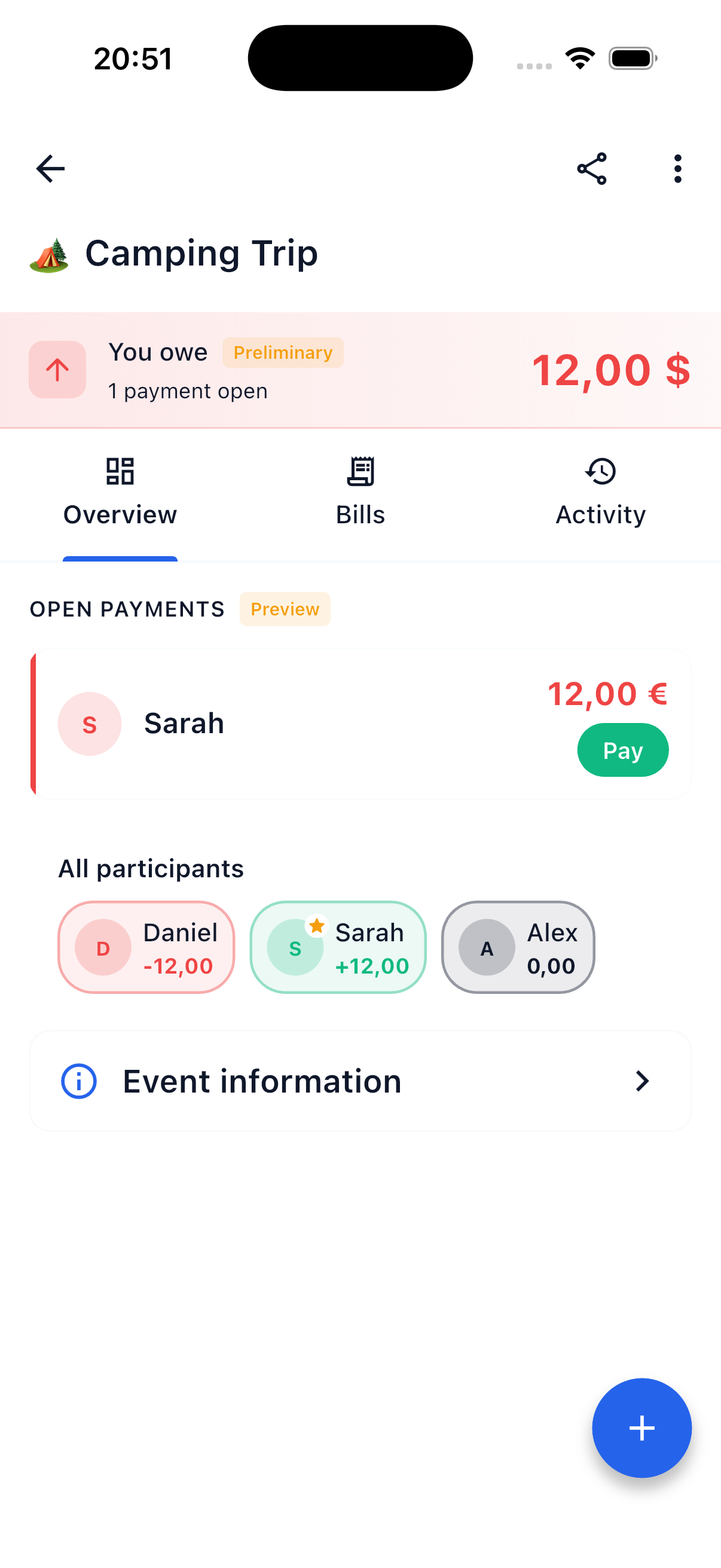
The Three Tabs in Event Detail
Bills
All bills created within this event. Each bill shows:
- Name of the bill (e.g., "Restaurant Dinner")
- Payer — Who paid?
- Total amount — How much was spent? Always shown in your profile currency.
- Status — Open and settled items
Balance
The balance view shows the net balance of each participant in the event — converted to your personal profile currency:
- Green chip — This participant is owed money
- Red chip — This participant owes money
Tap a balance chip to see settlement details: who this participant owes and from whom they'll receive money.
Activity
A chronological timeline of all actions in the event:
- Bills created or edited
- Items assigned or released
- Participants added or removed
- Settlements performed
Amounts here are also shown in the viewer's profile currency.
Multi-Currency Events
In events, every bill and every payment carries its own currency. SplitHappens automatically converts everything to your profile currency so your balance stays consistent and easy to read.
Your exchange rate stays put
When you save a bill or payment, SplitHappens locks in the current exchange rate for it. From that moment on, this specific rate applies to the bill — even if market rates later fluctuate. That way your balance won't shift retroactively just because the euro moves against the dollar.
If individual participants use different profile currencies, each of them sees the same facts in their own currency — the system converts for every viewer individually. More under Currencies.
Participant Details and Friend Request
In the participants area of an event you can tap any participant. A dialog opens showing their role (organizer or participant), their personal balance, and further details.
Add as Friend
If a fellow participant isn't in your friends list yet, you can tap "Add as friend" right in that dialog. The option only appears for registered users — guests and yourself are hidden. That way your friends list grows on the side during a shared event.
Optimized Settlement
For events with many participants, SplitHappens automatically optimizes payments (known as multi-way netting). Instead of everyone paying everyone individually, the system calculates the minimum number of transactions.
Example
Imagine a weekend trip with three people:
| Expense | Paid By | Amount |
|---|---|---|
| Vacation rental | Daniel | 320.00 EUR |
| Dinner | Sarah | 112.00 EUR |
| Boat trip | Alex | 60.00 EUR |
Total expenses: 492.00 EUR Per person: 164.00 EUR
Without optimization 4-6 transfers would be needed.
With multi-way netting SplitHappens calculates:
| From | To | Amount |
|---|---|---|
| Alex | Daniel | 104.00 EUR |
| Sarah | Daniel | 52.00 EUR |
Only 2 transfers instead of many individual transactions. The system automatically offsets and finds the optimal solution.
Organizer Rights
Editing Rights for Organizers
Event organizers can edit all event bills — change title, description, amounts, and items. However, only the original creator can delete a bill.
Payer Leaves an Event Bill
When the payer leaves an event bill, they are automatically replaced by a guest account. The bill remains in the event and continues to work normally. For friend bills, the payer can only leave by deleting the bill.
Start Settlement in Event
- Switch to the Balance tab in the event
- Tap the Settle button or a balance chip
- The system shows you which payments are needed
- Confirm the payment once you've made it
- The balance is updated
Difference from Friend Settlement
Event settlement considers only bills within this event. Other debts between you and your friends (e.g., from restaurant visits outside the event) are not included here. Use Friend Settlement for those.
Tips for a Clean Settlement
Best Practices
- Enter all bills before settling — this ensures the balance is accurate
- Let everyone assign their items — Everyone should claim their own items
- Archive the event after all debts are settled
- Take screenshots — For your own records before settlement
Related Topics
- Events Overview — Manage your events
- Create Event — Create a new event
- Friend Settlement — Settle debts outside of events